
Overview
Checkin Backstop is a batch setting that allows you to limit the time after checking in that a shopper must submit the shop report. This is intended for situations where you want to allow shoppers several days to perform the shop after claiming it (to support setting up routes, for example), but you want the report submitted promptly once the shop has been submitted.
The problem
In order to get shops filled, it's important to give shoppers options. By allowing more time from claim to completion, you make it easier for shoppers to plan ahead and secure shops that they may not be able to perform for several days. At the same time, your client needs prompt feedback. Once the shopper has visited the location, you need their report as soon as possible.
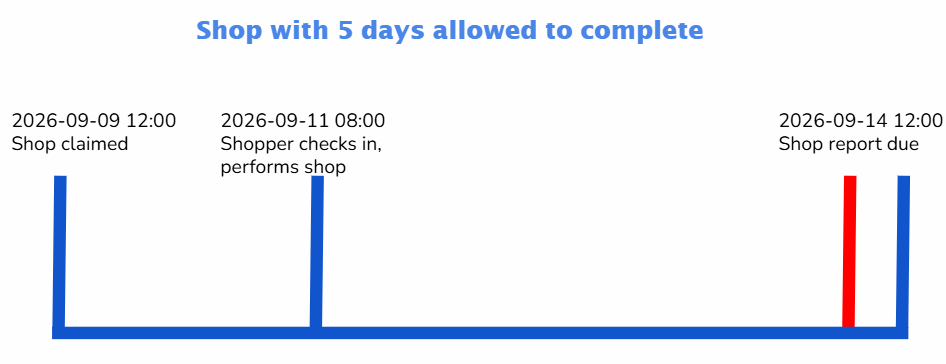
In the scenario below, the batch allows five days between the time that the shopper claims the shop and when the report must be submitted. the shopper claims a shop at 12:00 pm on September 9, travels to the shop location on September 11, and checks in at 8:00 am. The shop is performed on September 11, but the shopper has five days from the time they claimed the shop (until 12:00 pm on September 14) to submit the report. If the shop uncovered a critical issue at the location and the shopper waits until September 14 to submit the report, the information in the shop may no longer be actionable.
The solution: Checkin Backstop
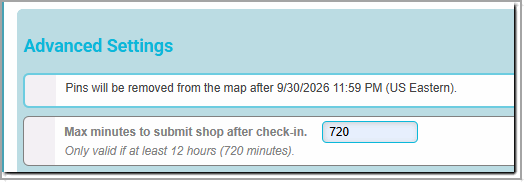
To solve this, Presto has added a new advanced batch setting a new batch setting that appears below the batch end date, in the Advanced Settings section. Prior to being set, this option appears as No reduced time to submit after check-in. After the option is set, this appears as Max minutes to submit shop after check-in. The minimum time allowed for a checkin backstop is 12 hours (720 minutes).
If we add a 12-hour backstop to the batch in the example above, the outcome is very different:
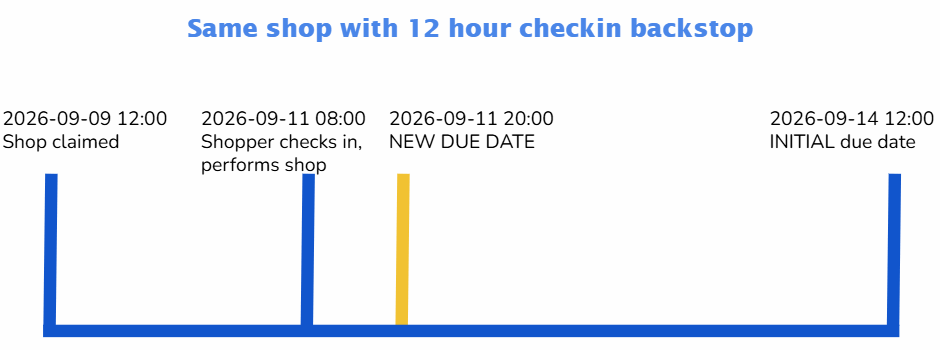
Once more, the shop was claimed at 12:00 pm on September 9, giving an initial due date of 12:00 pm on September 14. When the shopper checks in at 8:00 am on September 11, however, they are now notified that the shop report must be submitted within 12 hours, at 8:00 pm the same day.
Important Details
- Prior to claiming a shop on a batch with a checkin backstop, shoppers are shown a message that explains that they will have the backstop time after they check in to submit the report. They must check a checkbox stating that they agree to these terms before they can claim the shop.
- Checkin backstop will only take effect for shops that were claimed after the checkin backstop was set on the batch. Shops claimed prior to that time will not be affected.
- The checkin backstop can only reduce the amount of time available: it will never lengthen it.
- If a shopper's shop is due to expire at 12:00 pm on September 14 and they check in at 11:00 am on September 14, the expiration time is not changed.
- If there is a batch backstop, it will behave as it normally does. For example, if a batch ends on 2026-07-25 23:59 and it has an eight hour batch backstop, the batch backstop will limit any shop expiration to at most 2026-07-26 07:59 (standard batch backstop behavior). If the batch has a 12-hour checkin backstop, and the shopper waits until 2026-07-25 23:00 to check in, they won't get 12 hours from that point to submit the report. The expiration will remain at 2026-07-26 07:59.
- Subsequent checkins do not change the expiration time. Shoppers can't game the system by checking in repeatedly to reset the clock.